die_roller_bot
C0mmandBot for Nextcloud Talk - FORK
A simple bot to help with repeating questions, tasks, and a bit of fun. This fork has a die rolling and tarot card drawing function as well.
🐳 Installation (Nextcloud AIO)
This bot is a Nextcloud app-based bot — it runs inside the PHP process and self-registers with Talk automatically when enabled. No external server or webhook configuration is needed.
Requirements: Nextcloud 31–33 with the Talk app installed and enabled.
1. Check your Nextcloud version
docker exec --user www-data nextcloud-aio-nextcloud php occ status
2. Copy the app into the container
The destination folder name must be c0mmand_bot to match the app ID.
docker cp /path/to/die_roller_bot \
  nextcloud-aio-nextcloud:/var/www/html/custom_apps/c0mmand_bot
3. Fix file ownership
docker exec --user root nextcloud-aio-nextcloud \
  chown -R www-data:www-data /var/www/html/custom_apps/c0mmand_bot
4. Enable the app
This triggers the install repair step, which generates a shared secret and registers the bot with Talk automatically.
docker exec --user www-data nextcloud-aio-nextcloud \
  php occ app:enable c0mmand_bot
5. Verify the bot is registered
Note the bot’s ID from the output — you’ll need it in the next step.
docker exec --user www-data nextcloud-aio-nextcloud \
  php occ talk:bot:list
You should see an entry named C0mmandBot with the URL nextcloudapp://c0mmand_bot.
6. Add the bot to a conversation
Bots are registered server-wide but must be added to each conversation individually. The conversation token is the short alphanumeric string visible in the Talk URL when you open a conversation.
docker exec --user www-data nextcloud-aio-nextcloud \
  php occ talk:bot:setup <bot-id> <conversation-token>
Alternatively, a conversation moderator can do this through the Talk UI: open the conversation → ⋮ menu → Conversation settings → Bots, then toggle C0mmandBot on.
7. Test it
Send !command in the conversation — the bot should reply with its list of available commands.
Notes:
- The bot and its secret persist in Nextcloud’s app config and database across container restarts.
- After updating app files, run
php occ upgradeto apply any new database migrations.- To remove from a conversation: toggle it off in the Talk UI, or run
php occ talk:bot:unsetup <bot-id> <conversation-token>.- To uninstall entirely:
php occ app:disable c0mmand_bot.
💬 Default commands for all participants
- !command - List all commands
- !roll - Roll dice in standard notation
- !tarot - Draw a tarot card with a narrative interpretation
- !ltarot - Draw a tarot card with a longer, detailed interpretation
- !fortune - Display a random fortune
- !spelllist - List available SRD spell lists, or show the spell list for a given class
- !spells - Look up an SRD spell by name or partial name
- !class - Look up a class description by name or partial name
- !monsters - Look up a monster by name or partial name
- !magicitems - Look up a magic item by name or partial name
- !nimble - Look up a Nimble rule by name or partial name
- !rules - Look up an SRD rule by name or partial name
- !! - Browse custom content collections
🎲 Dice Rolling
Roll any combination of dice using standard RPG notation:
!roll 2d6
!roll 1d20+5
!roll 4d8-2
Returns each individual die result and the final total.
⚔️ Advantage and Disadvantage
Add adv or dis to roll twice and automatically use the higher or lower result:
!roll 1d20 adv
!roll 1d20 dis
!roll 2d6+3 adv
Both rolls are shown, followed by the final result:
Roll 1: Rolled 12 + (5)
For a total of 17
Roll 2: Rolled 4 + (5)
For a total of 9
FINAL ROLL: 17
🔮 Tarot
!tarot
Draws a random tarot card (upright or reversed) and returns a short narrative interpretation. The response weaves together the card, its orientation, and a randomly chosen meaning into a single sentence:
!tarot
Example response:
#The Moon in shadow: Your hopes and fears is about being wary of self-deception and avoidance
🃏 !ltarot
Draws a random tarot card and returns the full general interpretation from an extended tarot guide, with no additional framing or narrative — just the plain reading:
!ltarot
Cards drawn 1–78 are upright (light) interpretations; 79–156 are reversed (shadow) interpretations.
Example response:
The Moon reversed can indicate that you are getting the feeling that something is not right but are repressing those feelings or being untruthful with yourself about a situation...
🔮 Fortune
Displays a random fortune pulled from the fortunes file:
!fortune
Example response:
🔮 Speaking the truth in times of universal deceit is a revolutionary act. - George Orwell
📖 Spell Lists
!spelllist
With no arguments, lists all available SRD spell lists by class name:
!spelllist
Response:
📖 Which spell list would you like?
- Bard
- Cleric
- Druid
- Paladin
- Ranger
- Sorcerer
- Warlock
- Wizard
To view the full spell list for a class, provide the class name (case-insensitive):
!spelllist Druid
!spelllist druid
!spelllist DRUID
All three return the contents of the Druid spell list.
!spells
Looks up a spell by name from the SRD spell library.
No argument — prompts for input:
!spells
🧙Please give at least the first letter of the spell.
Single letter — returns all spells beginning with that letter:
!spells a
Exact or unique partial match — returns the full spell description:
!spells Fireball
!spells fireb
Ambiguous partial match — lists all matching spell names:
!spells fire
🧙Choose from these spells:
- Fire Bolt
- Fire Shield
- Fire Storm
- Fireball
No match — reacts with 👎.
📚 Adding spells and spell lists
Spell data comes from the Systems Reference Document (SRD). Adding content is straightforward:
- New spell: add a
.txtfile tolib/SRD/spells/. The filename (without extension) is the spell name used for lookups. - New spell list: add a
.txtfile tolib/SRD/spell_lists/. The filename (without extension) is the class name shown in!spelllist.
No code changes or restarts are needed — the bot reads the directory contents at runtime.
⚔️ Classes
!class
Looks up a class description from the SRD.
No argument — returns all available classes:
!class
Single letter — returns all classes beginning with that letter:
!class b
Exact or unique partial match — returns the full class description:
!class Druid
!class dru
Ambiguous partial match — lists all matching class names:
!class r
⚔️Choose from these classes:
- Ranger
- Rogue
No match — reacts with 👎.
📚 Adding classes
Class data comes from the Systems Reference Document (SRD). To add a new class, add a .txt file to lib/SRD/class/. The filename (without extension) is the class name used for lookups. No code changes or restarts are needed.
🧌 Monsters
!monsters
Looks up a monster stat block or description from the SRD.
No argument — prompts for input:
!monsters
🧌Please give at least the first letter of the monster.
Single letter — returns all monsters beginning with that letter:
!monsters d
Exact or unique partial match — returns the full monster entry:
!monsters Beholder
!monsters beh
Ambiguous partial match — lists all matching monster names:
!monsters dragon
🧌Choose from these monsters:
- Black Dragon
- Blue Dragon
- Brass Dragon
- ...
No match — reacts with 👎.
📚 Adding monsters
Monster data comes from the Systems Reference Document (SRD). To add a new monster, add a .txt file to lib/SRD/monsters/. The filename (without extension) is the monster name used for lookups. No code changes or restarts are needed.
🪄 Magic Items
!magicitems
Looks up a magic item description from the SRD.
No argument — prompts for input:
!magicitems
🪄Please give at least the first letter of the magic item.
Single letter — returns all magic items beginning with that letter:
!magicitems b
Exact or unique partial match — returns the full item description:
!magicitems Bag of Holding
!magicitems bag of hol
Ambiguous partial match — lists all matching item names:
!magicitems bag
🪄Choose from these magic items:
- Bag Of Beans
- Bag Of Devouring
- Bag Of Holding
- Bag Of Tricks
No match — reacts with 👎.
📚 Adding magic items
Magic item data comes from the Systems Reference Document (SRD). To add a new magic item, add a .txt file to lib/SRD/magic_items/. The filename (without extension) is the item name used for lookups. No code changes or restarts are needed.
📑 Nimble Rules
!nimble
Looks up a rule entry from the Nimble ruleset.
No argument — returns all available Nimble rule entries:
!nimble
Single letter — returns all Nimble rules beginning with that letter:
!nimble c
Exact or unique partial match — returns the full rule entry:
!nimble Conditions
!nimble cond
Ambiguous partial match — lists all matching rule names:
!nimble s
📑Choose from these nimble rules:
- Spells
No match — reacts with 👎.
📚 Adding Nimble rules
To add a new Nimble rule entry, add a .md file to lib/SRD/nimble/. The filename (without extension) is the entry name used for lookups. No code changes or restarts are needed.
📜 Rules
!rules
Looks up a rule entry from the SRD.
No argument — returns all available rule entries:
!rules
Single letter — returns all rules beginning with that letter:
!rules c
Exact or unique partial match — returns the full rule entry:
!rules Combat
!rules comb
Ambiguous partial match — lists all matching rule names:
!rules c
📜Choose from these rules:
- Combat
- Conditions
No match — reacts with 👎.
📚 Adding rules
Rule data comes from the Systems Reference Document (SRD). To add a new rule entry, add a .txt file to lib/SRD/rules/. The filename (without extension) is the entry name used for lookups. No code changes or restarts are needed.
📖 Custom Collections
!!
Browses custom content stored in lib/Custom/. Collections are subdirectories; each file inside is an entry.
No argument — lists all available collections:
!!
📖 Which collection would you like?
- speeches
- tables
One argument — lists all entries in a collection:
!! speeches
📖 Choose from:
- Harvest Speech
- Opening Ceremony
- Victory Address
Two arguments (quoted) — quoted second argument is treated as a single substring; returns the entry directly if exactly one match, or offers a choice if multiple:
!! speeches "Harvest Speech"
Returns the contents of Harvest Speech.md (or whichever file contains that substring in its name).
Two arguments (unquoted) — each space-separated word is an independent search term; a file matches if its name contains any of the words:
!! speeches The Binding Of
📖 Choose from these:
- The Artifact Device
- The Binding Of The Dark
No match — reacts with 👎.
📚 Adding custom collections and entries
- New collection: create a subdirectory under
lib/Custom/— its name is what you pass as the first argument. - New entry: add any text file (
.txt,.md, etc.) to the collection subdirectory. The filename without its extension is the display name used in listings and searches.
No code changes or restarts are needed.
⭐ Commands for moderators only
- !set - Create or update a command
!set !counter The counter was used {count} times - !unset - Remove a command
!unset !counter💱 Available placeholders
- {sender} - Replaced with a mention of the sender
- {mention} - Replaced with the first mention in the command
- {text} - All text that was provided after the command
- {count} - A counter how often the command was triggered already
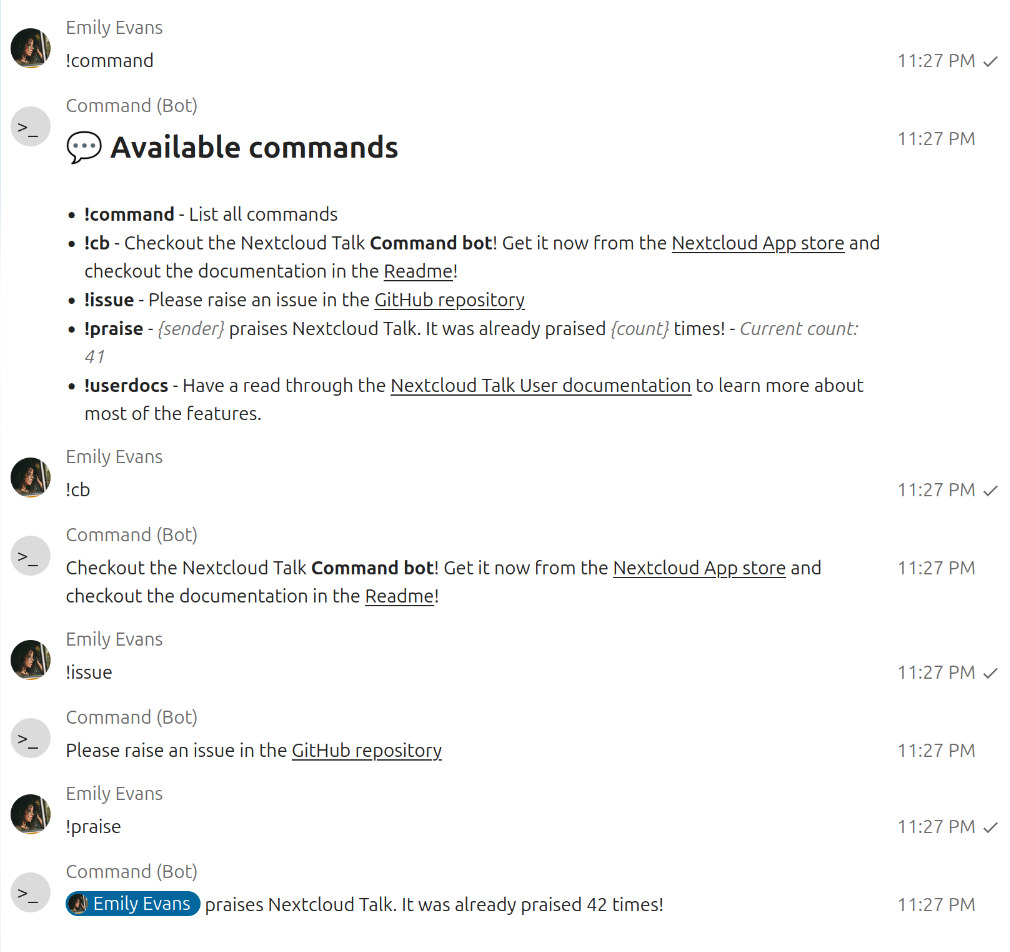
💡 Ideas for commands you could add depending on your use case
Simply post each command you’d like to add as a new message into your chat.
💛 Caring
!set !hug {sender} shows {mention} some love! 💛
!set !praiseall {sender} praises the community! Thanks everyone for being awesome! We all have been praised already {count} times!
📚 Helping each other
!set !english The prefered language is English. This allows more people to understand discussions and participate in them.
!set !cb Checkout the Nextcloud Talk **C0mmandBot**! Get it now from the [Nextcloud App store](https://apps.nextcloud.com/apps/c0mmand_bot) and checkout the documentation in the [Readme](https://github.com/nextcloud/c0mmand_bot)!
!set !userdocs Have a read through the [Nextcloud Talk User documentation](https://docs.nextcloud.com/server/latest/user_manual/en/talk/index.html) to learn more about most of the features.
!set !issue Please raise an issue in the GitHub repository: https://github.com/nextcloud/c0mmand_bot/issues/new/choose
🗜️ Shortcutting
!set !brb {sender} is right back! 🔙
!set !afk {sender} went to see the world!🚶➡️
!set !re {sender} is back at the desk! 💻